Raj Agrawal

Learnings from software and technology

  • Home
  • Technology
  • Software
  • Work
  • Play

Connect

  • GitHub
  • LinkedIn
  • YouTube

Powered by Genesis

You are here: Home / Archives for Raj Agrawal

Orange Tiny Terror (15 Watt/Combo) – Pure Awesomeness

September 30, 2010 by Raj Agrawal 7 Comments

AllTube Orange Tiny Terror Hands On Review

Ok, this is my first blog entry here and couldn’t get better than this. Today i’ll be telling you about this mind-blowing Amplifier i tried recently, none other than the AllTube Orange “Tiny Terror”.

By no means one should underestimate the power of this Amp and come to conclusions after reading it’s name. Since, i tried the combo, i would love to let you know about all the factory specs that Orange has provided us in this monster.

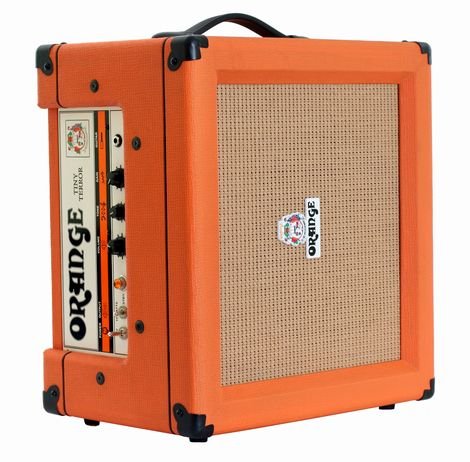
This Amp is available as a 15 watt head or a combo loaded with:

  • 2 EL84 power tubes
  • 2 ECC83 and
  • One 12AX7 preamp tube
  • Roars through a 12″ Celestion G12H-30
tiny terror
Side tilted view of Orange Tiny Terror Combo 15 Watt Amp
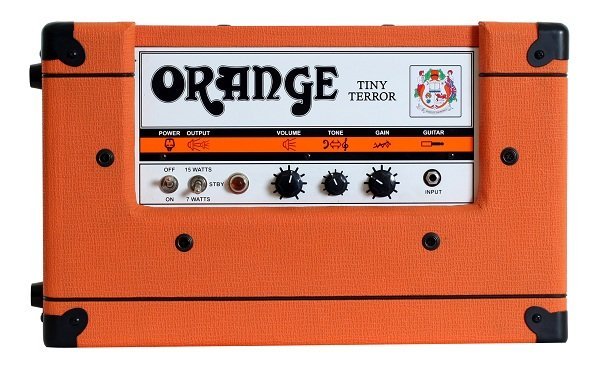
Top Angle View

It clearly sends all other Amps in this range of wattage/price home. The console is very simple for one to understand. In the order from left to right, we have, first the ON/OFF switch, followed by a three-way toggle switch that allows you to use the Amp at 7Watts or 15 Watts, or lets you put the Amp on standby.

After that comes the LED/bulb indicating that the Amp is switched ON/OFF, then the Volume, Tone and the Gain Knobs, and lastly the input. Talking about the tone, you get out of this is sheer pleasure. The gain range is wide enough to tempt you to throw away your overdrive pedals, a Classic British “Orange” sound. Right from a nice chunky clean tone to really fat overdrive, the tubes are made to deliver the best. The tone knob adjusts the higher ‘Mids’ in your sound, enough to give you tonnes of possibilities on one dial, since simplicity is one of the best elements of this Amp. about the volume, it will make you forget that you are playing through a 15 watt, this Amp is f****** loud. Good for intimate gigs to moderate size shows. This will serve you great at any gig, must mic it and send it through the PA and you have your sound wherever you want.

I played this Amp straight with a Fat Strat, and the sound delivered on any setting was an amalgam of smooth, creamy, fat and punchy, usual, but all for the best. The down side for this one would be the weight (17kgs) which is a typical tube-amp issue, and its price(859$ on musician’s Friend), but again quality doesn’t come cheap.

So, if you are looking for an Amp that will be great for practice, as well as a decent one for gigs, then this one will surpass your expectations. This “Orange” monster is meant to be played LOUD!

Filed Under: Consumer Technology

Stay Fully Protected Without Using An Anti-Virus Program – Part II

September 13, 2010 by Raj Agrawal 2 Comments

This article covers on How To Stay Completely Safe from Malware Infections when Offline.

Previously, I had written and shared a tutorial for you on how to use the Sandboxing technique to easily and safely avoid being infected on the internet. I had revised the tutorials several times to make them clear, precise and simple enough to allow each and every reader grasp the concept and it’s implementation process. This being the second part of the “main idea”, take your time to read this article on how you can avoid and even ‘safely’ play around/ test malware infected programs. Malware includes computer viruses, worms, trojan horses, spyware, dishonest adware, crimeware, most rootkits, and other malicious and unwanted software.|Wiki|

hacker injecting computer
Hack!

We all know that malware can intrude our computer from USB drives and disks. You insert your colleague’s pen drive not knowing that it’s infected and you soon realize that your computer is no longer working as it should. Or you want to try out a software/ game that you aren’t sure if it is infected or not. These two scenarios is usually encountered by almost every Windows user.

Downland and install these freeware tools in order to make the entire concept work:

  • Sandboxie
  • Malwarebytes (this anti-malware program does not run as a background process and is very useful to check and confirm the safety of your computer after you have done using the infected program in the sandbox)

Points to Remember before we start:

  • Use this method for experimental purpose. If you are not comfortable implementing it then stop using this method right away and use an anti-virus program to stay safe.
  • Take responsibility for websites you visit, links you click on and things you download, if you wish to stay safe.
  • No virus can harm your system unless it is executed and running.
  • This article has nothing to do with using a firewall. If your computer is connected to any network like the internet itself, then it is 100% important to use a firewall.
  • Smarter techniques always require some effort for implementation.
  • Use Malwarebytes freeware as it does not run in the background thus saving your resources and use it to scan new media like USB drives, CDs, DVDs, e.t.c
  • Skills required to understand and implement this guide: Intermediate to Experienced user.
  • This tutorial is suitable only for Windows Operating Systems: Windows XP and later.
  • This tutorial will teach you to set up your computer to “not use anti-virus protection is background” and in such a way that you run applications, whether infected or not, in a safe and fake environment and whenever your end up executing a infected program, you can easily stop and reverse the actions of the program with just closing it.

Benefits of implementing this method:

  • You won’t have to buy anti-virus, anti-malware programs.
  • Your computer would be much safer than what you would get with the anti-malware programs.
  • Your computer will run faster as more RAM will be available without the anti-virus running in the background.

The Tutorial:

  • Select and run any suspicious file/ program by using the right click option as shown in the illustration,
sandboxie select
Screen 1
  • Sandboxie will run the selected program in a safe and “isolated” environment,
  • When you are done using the concerned program, right click on the program name in the Sandboxed list and click ‘terminate’,
Screen 2
  • This will terminate the program and remove all the files and infections (if any) that the program had created from the ‘isolated’ environment.
  • Using program like paint/ photoshop requires project files to be saved after the work is done. Using these programs sandboxed will give you a message asking to ‘recover’ the saved file from the sandbox or to ‘keep’ them inside the sandbox. Recovering will get your project work safely out of the sandbox and thus avoid getting deleted. Keeping it inside will of course, get deleted once the program is terminated.
sandboxie files recovery
Screen 3
  • If you want to make sure if your computer is really safe after all this, you should scan your computer with Malwatebytes program or any anti-virus program you prefer. I suggest you to use Malwarebytes since as said before, does not run as a background process thus reducing the possibility of your computer getting slowed down.

This technique will require patience and practice initially. But, it is a nice experiment to try out. 😀

So, what are your thoughts on this?

Filed Under: Technology Tagged With: security

An Open Source Anti-Facebook Social Network Is Coming

September 3, 2010 by Raj Agrawal 1 Comment

Diaspora, unlike the corporate giants like Facebook, is an Open Source social networking website project that features privacy-aware, personally controlled socializing. This means, the privacy of the user interactions will be in full control of the user themselves.

It is fair to call it an Anti-Facebook initiative. The Diaspora project has been started by New York University students with an aim to serve the online social networking consumers a much better and fully secured-privacy controlled socializing. The highly anticipated Open Source social networking website ‘Diaspora’, is set to release on Sept, 15th 2010 and has successfully gathered more than $2,00,000 funding from all over.

Interestingly, the Facebook founder Mark Zuckerberg has also funded his share to this project. As a tradition of Open Source community, the source code of Diaspora will be made available publicly on the day it will be launched. Diaspora also plans to provide some amazing set of services viz.

  • OpenID
  • Voice-over IP
  • Distributed Encrypted Backups
  • Instant Messaging protocol
  • UDP integration

The interface and the exact features of Diaspora has not yet been confirmed yet but you can expect what it would probably look like,

diaspora screenshot
A preview snap of diaspora, the probable interface

It’s hard to say how well this initiative will do. The user interface and the feature set are the keys to the success of social networking business. Looking at the snap shot, the interface looks very clean and simple. Not much can be said as of now. Being Open Source, it is sure to attract a huge mass of geeky audience. Depending on how well it is implemented and depending on the feature set, Diaspora’s level of success will glow accordingly.

Wiki defines – Diaspora (In Greek: scattering of seeds) as the movement or migration of a group of people, such as those sharing a national and/or ethnic identity, away from an established or ancestral homeland.

What are your views on this? Do you think Diaspora will defeat the giants like Facebook considering it being a privacy focused social network?

Filed Under: Consumer Technology Tagged With: web

  • « Previous Page
  • 1
  • …
  • 51
  • 52
  • 53
  • 54
  • 55
  • …
  • 79
  • Next Page »