
Techinline provides an easy to use solution for day to day activities via remote desktop connectivity. It’s simple approach, relative to most other remote desktop solutions available in the market, makes it a must have application.

- Features –
- 2-Way Desktop Sharing
- Customization & Integration
- Remote Reboot & Reconnect
- Browser-Based Solution
- Easiest Connection
- Reporting Tool
- Multi-Monitor Support
- Firewall/Proxy Transparency
- Auto Scroll and Auto Scale
- File and Clipboard Transfer
- Instant Messaging Chat
- 100% Windows 7 Capable
- Security
Uses SSL and Code Signing Certificate issued by the Comodo Certificate Authority.
- Performance
Techinline is regarded as an easy to use alternative to some of the more complex and expensive remote support tools on the market like LogMeIn, Webex and GoToAssist. It’s feature-set may not be as complete as LogMeIn, but nevertheless it does include the “core” functionality one may need for their day to day remote support activities
- System Requirements
- Microsoft Windows 2000, XP, Server 2003, Vista, Server 2008, Windows 7
- Microsoft Internet Explorer 6.0 or later, Firefox 1.5 or later, Chrome 4 or later
- A modem connection. DSL/Cable or better is recommended.
- No Support for Mac OSX for now. The company may add compatibility for it in future.
- Support
Support is available via phone and email. All email requests are guaranteed to be answered within 24 hours from submission. Phone support is available during 7 AM – 4 PM Eastern Standard Time (Monday to Friday)
- Pricing
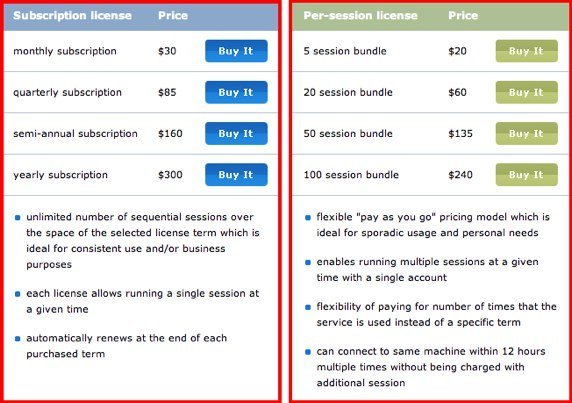

I use remote desktop app form time to time and Techinline is very helpful in this case. I mean their “pay as you go” option. Very flexible and reliable software and it’s worth the money, in my opinion.
Additionally, tools like R-HUB remote support servers, logmein etc. are also used by businesses globally for remotely accessing computers. They work well.