Raj Agrawal

Learnings from software and technology

  • Home
  • Technology
  • Software
  • Work
  • Play

Connect

  • GitHub
  • LinkedIn
  • YouTube

Powered by Genesis

You are here: Home / Archives for windows

Bomgar 11.1 Provides The Very Best In Remote Support Solutions

September 5, 2011 by Raj Agrawal 1 Comment

Bomgar is the world leader when it comes to remote desktop support solutions for computers, servers, smartphones, tablets and other network devices. It uses the network connection of these devices to provide support solutions for the customers. Using Bomgar remote support, the users can control and provide support for the devices using this network connection. This reduces the need for onsite visits, phone support and allows the reps to respond to peak demands effectively. Hence, it can empower your support team to monitor, control and provide solutions for mobile devices and computers in an efficient manner.

bomgar logo
Bombar branding

Bomgar 11.1 is is designed to give companies the leading edge when it comes to providing support solutions for their customers. This makes providing support solutions efficient and cost effective for the investing companies. Some of the brilliant features and enhancements of Bomgar 11.1 are listed below.

Key Features

bomgar mac repconsole
Screen 1

 Representative productivity tools

Reps have the ability to support an unlimited number of unattended devices with the new Jump Client Scalability feature. The Enhanced Multi-Monitor Support increases the reps ability and speed to resolve issues that span multiple monitors.

Mobility tools

The iPad Rep Console extends Bomgar’s suppot solution capabilities to the iPad tablet device. The Bomgar Android Client delivers support to users on smart-phones and tablets with the industry leading Android platform.

bomgar blackberry-remote-control
Screen 2

Support Performance Analytics

Bomgar Analytics optimizes your support operations by speeding up your understanding and resolutions of IT critical support challenges and opportunities. It provides dashboard view for industry standard reports and tracks performance over time. Thus is allows the reps to fine tune their operations and customize reports.

Tighter support for Web based applications

Bomgar allows the user to streamline round – trip integration with critical web based applications such as help desk ticketing systems. Rep Console Scripting enhances the console and API to initiate command from other applications. The Rep Console Custom Link creates a one click shortcut back to the ticketing systems and other web based applications.

Tight focus on Security

Bomgar’s Embassy Authentication feature enables control over trust subject matter experts and maintains security over sessions with your support teams. This feature offers LDAP and RADIUS authentication.

Some key enhancements found in version 11.1 include

  • Silent Support – Sessions can now be started in the users task bar to provide unobtrusive support.
  • Rep Console Notifications – Keeps reps updates about important action points. Provides notifications in the form of pop ups and visual alerts.
  • SMS Session Start – Sessions can now be started via the mobile using SMS facility.
  • Mobile System Info. Logging – Information about remote device can now be captured and used by the support reps to gain a better understanding about the device in order to provide better support.
  • Disable Session Key – Redundant session keys from web based applications can now be disabled by removing the keys at the rep level.
  • Auto-join a Session – The support reps can now automatically connect to active sessions to rapidly provide a higher level of support to the customers and resolve critical issues.
  • Inactive Session Timeout – Inactive sessions will now be timed out automatically.
  • Uninterrupted License Updates – Licenses can now be updated and added without the need to schedule them or restart the Bomgar software.
bombar parallel
Bomgar B100

Bomgar currently is compatible with all the major operating systems for computers as well as mobile phones (mobile remote support) and tablets and supports most of the handheld devices. In order to try Bomgar, you have to request for an evaluation after which a bomgar representative will get back to you shortly.


The evaluation form can be found here.

Filed Under: Consumer Technology Tagged With: Android, linux, mac, windows

Air Playit Aptly Streams Music/ Videos Via Cloud [iOS] [OS X] [Win]

August 19, 2011 by Raj Agrawal Leave a Comment

Digiarty Software’s Air Playit app (freeware) for iOS, streams videos/ music well with a variety of formats on the Apple iPad, iPhone, and iPod touch devices. It works with WiFi or 3G/4G network to stream videos in almost 320 formats and it’s cloud service lets you stream videos wherever you are.

Air Playit
Air Playit Screen

Working demo

For streaming videos

  • Air Playit lets you convert videos on the fly in a variety of formats for Apple devices.
  • It lets you convert videos offline.
  • Air Playit has the ability to stream music and videos on other multimedia devices such as televisions.
  • You can now access the playlist directly via the web browser.

For streaming music

  • Air Playit lets you stream music directly to your Apple device by using your Wifi and/or 3G/4G connection. It supports a variety of formats such as MP3, AAC, AIFF, and WAV.
  • Files once played on your device will automatically be cached to your music library. You can then play these files offline without the need for an internet connection.

For streaming downloads

  • It helps you stream video downloads directly to your iphone/ipad using any available WiFi service. You can then watch the video when no network is available.
  • Air Playit stores all the downloads in the task queue so that it becomes easier for the user to access them via their Apple device. All you have to do is tap the “Download to iphone/ipad button”, and Air Playit will download the video/audio to your device.

System Requirements

  • Windows OS(XP, 2000, Vista, 7)
  • Mac OS(Leopard/Snow, Leopard/Lion)
  • Apple iPad, iPhone, iPod touch with firmware 3.0 or newer

What about Android and Windows Mobile?

For now, the app is confined to iOS only. The future versions will support Android and Windows Mobile.

Filed Under: Technology Tagged With: iOS, windows

Techinline – An Easy To Use Remote Desktop Solution

August 7, 2011 by Raj Agrawal 2 Comments

Techinline provides an easy to use solution for day to day activities via remote desktop connectivity. It’s simple approach, relative to most other remote desktop solutions available in the market, makes it a must have application.

techinline logo
Brand Logo
  • Features –
  1. 2-Way Desktop Sharing
  2. Customization & Integration
  3. Remote Reboot & Reconnect
  4. Browser-Based Solution
  5. Easiest Connection
  6. Reporting Tool
  7. Multi-Monitor Support
  8. Firewall/Proxy Transparency
  9. Auto Scroll and Auto Scale
  10. File and Clipboard Transfer
  11. Instant Messaging Chat
  12. 100% Windows 7 Capable
  • Security
Uses SSL and Code Signing Certificate issued by the Comodo Certificate Authority.
  • Performance
Techinline is regarded as an easy to use alternative to some of the more complex and expensive remote support tools on the market like LogMeIn, Webex and GoToAssist. It’s feature-set may not be as complete as LogMeIn, but nevertheless it does include the “core” functionality one may need for their day to day remote support activities
  • System Requirements
  1. Microsoft Windows 2000, XP, Server 2003, Vista, Server 2008, Windows 7
  2. Microsoft Internet Explorer 6.0 or later, Firefox 1.5 or later, Chrome 4 or later
  3. A modem connection. DSL/Cable or better  is recommended.
  4. No Support for Mac OSX for now. The company may add compatibility for it in future.
  • How to use guide
  • Support
Support is available via phone and email. All email requests are guaranteed to be answered within 24 hours from submission. Phone support is available during 7 AM – 4 PM Eastern Standard Time (Monday to Friday)
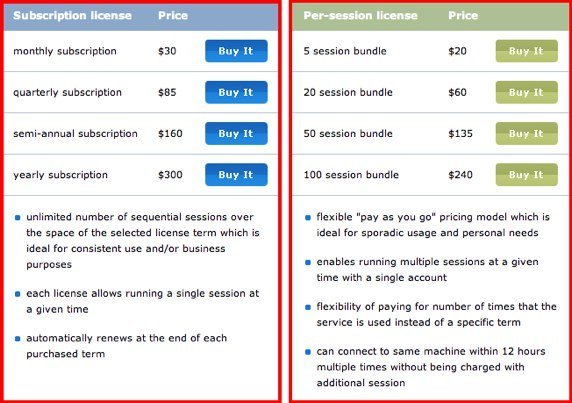
  • Pricing
techinline pricing

Filed Under: Consumer Technology Tagged With: windows

  • « Previous Page
  • 1
  • 2
  • 3
  • 4
  • …
  • 6
  • Next Page »