Raj Agrawal

Learnings from software and technology

  • Home
  • Technology
  • Software
  • Work
  • Play

Connect

  • GitHub
  • LinkedIn
  • YouTube

Powered by Genesis

You are here: Home / Archives for Consumer Technology

The green dilemma – E-Books or paper books?

November 13, 2011 by Raj Agrawal 1 Comment

It’s an amusing sight to witness the sales of electronic books gradually boom with the mass availability of portable and affordable e-book reading devices. The one winning idea of “one device: thousand books” has shot a prodigious effect on the conventional ways of how information is imparted to the masses. This does not mean the digital are books taking over the regular paper books, nor it will happen any time soon. But, would you prefer sacrificing the comfort of the traditional paper books over the environment friendly digital books? Seemingly, the recent facts and stats speak out an educating story. 

E-Books Or Paper Books? Retailmenot.com has shared an infographic, (pointing to the American market) illustrating the statistics and pros/ cons to help the readers snap out of this dilemma.


ebooks or paper books
Book Buzz

Filed Under: Consumer Technology

A Complete Guide To IMPS Technology, The New Age Of Payments In India

September 8, 2011 by Raj Agrawal 2 Comments

The National Payments Corporation of India, which handles retail payments all across the country, has now come up with a new service for cashless payments.

NPCI-logo
NPCI branding

Before we proceed, let’s consider a few situations which, i believe all of us would have experienced at some point or the other:

  • You are out with your friends and at the end, everyone starts pitching in money and starts grappling with change, also creating an embarrassing scene.
  • Students in hostels have their money stolen too many times and face problems.
  • You are talking on the phone and you run out of prepaid balance.
  • Your friend calls from another part of town/country and is in dire need of cash at 4 am in the morning.

IMPS (Inter-Bank Mobile Payments Service), allows people to send money from one account (sender) to another account (receiver) within seconds just by using a mobile handset. Moreover, any mobile handset ranging from the simple Nokia 1100 to a high end Nokia N8 may be used. It even works on Android, iPhone, Windows and any other mobile phone. The service can work over GPRS/ TEXT MESSAGES/USSD/WAP, whichever the user may prefer.
So if one person pays for the lunch, rest can transfer money directly into his account and that too instantly.

IMPS is not just restricted to transfers. You can even pay for your coffee or your vegetables instantly by transferring money from your mobile.

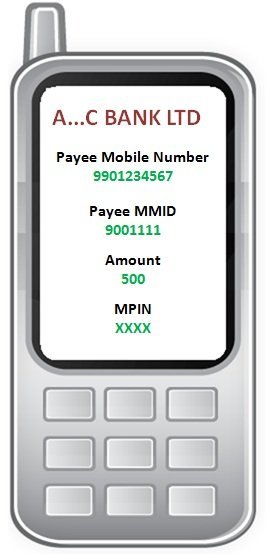
mob pic
Screen 1

All a user needs to do to send money is, open the mobile application, enter the payee (receiver) Mobile number, the MMID, the amount to be transferred, the MPIN (password akin to ATM PIN) and then hit SEND.

MMID is assigned to the user by the bank when he registers himself as a mobile banking customer with his bank. The MMID is basically a 7 digit number consisting of a 4 digit NBIN (national bank identification) and a 3 digit MAS (mobile account selector).

The users mobile number and the MMID together form a 17 digit unique number that identifies the account. Since there are 2 parameters (Mobile no. and the MMID), typo errors are eliminated, ie. , entering a wrong mobile number or MMID will not lead to your money getting transferred to another account. Also, to receive money a person DOES NOT have to reveal any account details.

If you are a Sender (To send money)

  1. Login to the application and select the IMPS option or use the SMS facility in your mobile if your bank provides IMPS on SMS,
  2. Get Beneficiary Mobile number and MMID,
  3. Enter Beneficiary Mobile number, beneficiary MMID, Amount and your MPIN and send,
  4. Await confirmation SMS for the debit in your account and credit in beneficiary account,
  5. Note the transaction reference number for any future query.

If you are a receiver (To receive money)

  1. Share your Mobile number and MMID with the remitter.
  2. Ask the remitter to send money using your Mobile number and MMID.
  3. Check the confirmation SMS for credit to your account from the remitter.
  4. Note the transaction reference number for any future query.
  5. The best part about this service is that the money transfer takes place within a few seconds, i.e. it’s INSTANT and it works on holidays even at midnight!

This service is free of cost for the consumers.Only pre-requisites for this service is for a person to have a bank account and a mobile handset, which is linked to his account and activate mobile banking (if you are a sender). The registration process in some banks for mobile banking is as simple as sending a text message to the banks short/long code and the user details are generated.

The key features of this service are

  • Instant interbank fund transfers
  • 24 x 7 x 365 availability
  • No sharing of bank account details
  • Credit and debit confirmations to sender and receiver
  • Simple & easy to use
  • Time & cost saving
  • Safe & secure

NPCI (National Payments Corporation of India) is an organization formed under Reserve Bank of India and chaired by Mr Narayan Murthy. NPCI has services such as CTS (Check Truncation System, FI (Financial Inclusion), UIDAI (Aadhaar Card), NFS (National Financial Switch), etc. NPCI focuses on building customer friendly electronic retail payment systems.

As of yet, there are 27 banks that offer IMPS across the country.

For clarifications/ queries, visit www.npci.org.in or write to imps@npci.org.in.

Filed Under: Consumer Technology

Bomgar 11.1 Provides The Very Best In Remote Support Solutions

September 5, 2011 by Raj Agrawal 1 Comment

Bomgar is the world leader when it comes to remote desktop support solutions for computers, servers, smartphones, tablets and other network devices. It uses the network connection of these devices to provide support solutions for the customers. Using Bomgar remote support, the users can control and provide support for the devices using this network connection. This reduces the need for onsite visits, phone support and allows the reps to respond to peak demands effectively. Hence, it can empower your support team to monitor, control and provide solutions for mobile devices and computers in an efficient manner.

bomgar logo
Bombar branding

Bomgar 11.1 is is designed to give companies the leading edge when it comes to providing support solutions for their customers. This makes providing support solutions efficient and cost effective for the investing companies. Some of the brilliant features and enhancements of Bomgar 11.1 are listed below.

Key Features

bomgar mac repconsole
Screen 1

 Representative productivity tools

Reps have the ability to support an unlimited number of unattended devices with the new Jump Client Scalability feature. The Enhanced Multi-Monitor Support increases the reps ability and speed to resolve issues that span multiple monitors.

Mobility tools

The iPad Rep Console extends Bomgar’s suppot solution capabilities to the iPad tablet device. The Bomgar Android Client delivers support to users on smart-phones and tablets with the industry leading Android platform.

bomgar blackberry-remote-control
Screen 2

Support Performance Analytics

Bomgar Analytics optimizes your support operations by speeding up your understanding and resolutions of IT critical support challenges and opportunities. It provides dashboard view for industry standard reports and tracks performance over time. Thus is allows the reps to fine tune their operations and customize reports.

Tighter support for Web based applications

Bomgar allows the user to streamline round – trip integration with critical web based applications such as help desk ticketing systems. Rep Console Scripting enhances the console and API to initiate command from other applications. The Rep Console Custom Link creates a one click shortcut back to the ticketing systems and other web based applications.

Tight focus on Security

Bomgar’s Embassy Authentication feature enables control over trust subject matter experts and maintains security over sessions with your support teams. This feature offers LDAP and RADIUS authentication.

Some key enhancements found in version 11.1 include

  • Silent Support – Sessions can now be started in the users task bar to provide unobtrusive support.
  • Rep Console Notifications – Keeps reps updates about important action points. Provides notifications in the form of pop ups and visual alerts.
  • SMS Session Start – Sessions can now be started via the mobile using SMS facility.
  • Mobile System Info. Logging – Information about remote device can now be captured and used by the support reps to gain a better understanding about the device in order to provide better support.
  • Disable Session Key – Redundant session keys from web based applications can now be disabled by removing the keys at the rep level.
  • Auto-join a Session – The support reps can now automatically connect to active sessions to rapidly provide a higher level of support to the customers and resolve critical issues.
  • Inactive Session Timeout – Inactive sessions will now be timed out automatically.
  • Uninterrupted License Updates – Licenses can now be updated and added without the need to schedule them or restart the Bomgar software.
bombar parallel
Bomgar B100

Bomgar currently is compatible with all the major operating systems for computers as well as mobile phones (mobile remote support) and tablets and supports most of the handheld devices. In order to try Bomgar, you have to request for an evaluation after which a bomgar representative will get back to you shortly.

The evaluation form can be found here.

Filed Under: Consumer Technology Tagged With: Android, linux, mac, windows

  • « Previous Page
  • 1
  • …
  • 9
  • 10
  • 11
  • 12
  • 13
  • …
  • 25
  • Next Page »