Raj Agrawal

Learnings from software and technology

  • Home
  • Technology
  • Software
  • Work
  • Play

Connect

  • GitHub
  • LinkedIn
  • YouTube

Powered by Genesis

You are here: Home / Archives for Consumer Technology

Techinline – An Easy To Use Remote Desktop Solution

August 7, 2011 by Raj Agrawal 2 Comments

Techinline provides an easy to use solution for day to day activities via remote desktop connectivity. It’s simple approach, relative to most other remote desktop solutions available in the market, makes it a must have application.

techinline logo
Brand Logo
  • Features –
  1. 2-Way Desktop Sharing
  2. Customization & Integration
  3. Remote Reboot & Reconnect
  4. Browser-Based Solution
  5. Easiest Connection
  6. Reporting Tool
  7. Multi-Monitor Support
  8. Firewall/Proxy Transparency
  9. Auto Scroll and Auto Scale
  10. File and Clipboard Transfer
  11. Instant Messaging Chat
  12. 100% Windows 7 Capable
  • Security
Uses SSL and Code Signing Certificate issued by the Comodo Certificate Authority.
  • Performance
Techinline is regarded as an easy to use alternative to some of the more complex and expensive remote support tools on the market like LogMeIn, Webex and GoToAssist. It’s feature-set may not be as complete as LogMeIn, but nevertheless it does include the “core” functionality one may need for their day to day remote support activities
  • System Requirements
  1. Microsoft Windows 2000, XP, Server 2003, Vista, Server 2008, Windows 7
  2. Microsoft Internet Explorer 6.0 or later, Firefox 1.5 or later, Chrome 4 or later
  3. A modem connection. DSL/Cable or better  is recommended.
  4. No Support for Mac OSX for now. The company may add compatibility for it in future.
  • How to use guide
  • Support
Support is available via phone and email. All email requests are guaranteed to be answered within 24 hours from submission. Phone support is available during 7 AM – 4 PM Eastern Standard Time (Monday to Friday)
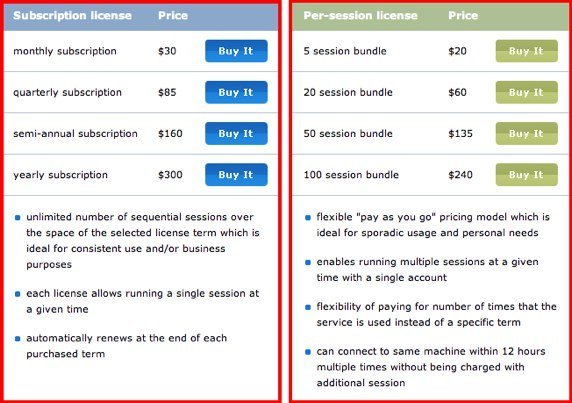
  • Pricing
techinline pricing

Filed Under: Consumer Technology Tagged With: windows

W3C September 2011: Kinect For An Interactive Television?

August 7, 2011 by Raj Agrawal Leave a Comment

UPCOMING TECHNOLOGY – The Upcoming W3C Web and TV workshop is scheduled to continue it’s journey, this time at Hollywood, California, USA. It’s a two day event between 19th – 20th September, 2011. The motive behind this event is to continue the global conversation on the convergence of Web and Television to provide more entertaining content. Adam Sobieski, a contributor to the forum has laid down some interesting view points on the topic.

kinect-interactive-technology
Emily Gobeille – Theo Watson, Youtube (Microsoft Kinect Hack)

If you have suggestions/ pointers on his following commentary, head over to the original MSDN forum thread.

In Adam Sobieski’s words:

With the natural user interfaces and television combining, interactivity is arriving for previously broadcast content. Amidst a large set of new and exciting possibilities is that people will be able to use hand gestures to select video intervals or segments of interest and to then create either text or video commenting to or providing feedback to those segments of video, including news and punditry. Users can share such reactions to the web, their blogs, social networking and elsewhere. At E3 2011, Microsoft announced that live television would be coming to the XBox 360 this autumn. Many are optimistic that these new technological developments can empower the people; there is opportunity for innovation in terms of entirely new ergonomics concepts and features.

In addition that new feature, an ergonomics idea is that DVD or Blu-ray style menus can be at the start of episodes, movies or otherwise video content. Where there were once theme songs or intros, there can now be stylized interactive menus. Such menus can indicate special features, for example recaps of previous episode(s), and then, after the video content, the same or other menus can appear, perhaps making use of the internet to provide enhanced features such as navigation options to online user experiences.

Content that previously included video diagrams can include interactive 3D applets. Science and educational shows, for example, have made use of video diagrams, often with computer graphics. Applets making use of 3D hardware on consoles and computers can be integrated and launched seamlessly in sequences of content, including overlapping intro and outro audio clips. Applets can include default sequences of animation, camera motion and audio, to resemble a video diagram while, at any point in time during the applets, the audience members can utilize NUI for robust interaction and enhanced user experiences. Interactive television can greatly enhance scientific and educational content.

Filed Under: Consumer Technology Tagged With: web

Drippler Keeps You Updated With ‘Everything’ About Your Gadget

August 2, 2011 by Raj Agrawal Leave a Comment

The final version of Drippler is out! It’s an all info-under-one-roof-portal for any gadget you wish to keep a track of. It’s a wonderful concept to have all updates at a single place and at the user’s convenience. In case you aren’t aware about Drippler, I recommend you to take your time and read through the following question-answer session we conducted, in a conversation with the co-founder and CEO of Drippler.

What is Drippler about?

Drippler is about providing consumers with the latest updates, news & rumors about their gadgets.

How is Drippler different from the existing array of well established Gadget information portals?

The main two differences are:

  • Personalization: Drippler provides updates that are relevant to your gadgets. Each and every users gets a personalized dashboard (My Drips) with the latest updates, news & rumors (Drips) relevant to his/her gadgets, and a weekly personalized email with a summary of the most important Drips. This saves the hassle of searching and browsing (on other sites you have to look for the news that interests you), and makes sure you are always up-to-date.
  • Curation: Drippler scans the web and brings the most relevant content on each model. That way, you get the full picture and don’t miss any critical news.

What features does it offer?

Drippler has a product page for each model with the latest Drips, as well as a page for all brands and categories. It allows registered users to choose the gadgets they have and ones they are interested in, and get a personalized dashboard (My Drips) with the latest Drips relevant to his/her gadgets, and a weekly personalized email with a summary of the most important Drips. (They can always update their gadget list).

Users can comment and discuss the Drips with the community of users of the gadgets they own, and also help the community by “Liking” Drips, flagging them as “Important”, “Duplicate” and so on, improving the sorting and screening of content on the site.

Users can add Drips to their “Favorites” and go back to those Drips whenever they want (useful for reading later, or saving useful manuals etc).

Drips can be sorted on “My Drips” or product pages chronologically (Latest) or according to popularity (Popular). 

Screenshot (Click on the image to view it’s full size)

What mobile platforms is the Drippler app available?

The site can be accessed from all smart phones. Drippler also has an Android app which keeps you updated on your Android – (support for many additional Android models coming soon)

Who is the team behind Drippler?

We are a team of gadget enthusiasts. After missing out on many important firmware updates, cool apps, tech issues and other important content about our gadgets, we decided to help others stay updated on their gadgets, and created Drippler.

When was the website originally founded?

Our limited Alpha site was launched on March 2010. Sign-up and the personalized features were officially launched in January 2011.

What are the future plans for Drippler? What can the users/ fans expect?

We plan to add more community features to leverage the user community around each gadget and allow people to share content (tips & tricks, videos and so on). We plan to support additional gadget categories (cameras, GPS, laptops, video games and more)

Filed Under: Consumer Technology Tagged With: web

  • « Previous Page
  • 1
  • …
  • 10
  • 11
  • 12
  • 13
  • 14
  • …
  • 25
  • Next Page »